One design, every format
Display, social and digital screens from the same design – without building each format separately.
With Frontrunner, you create banner ads right in the tool – from your Figma template or your product catalogue. One design automatically becomes every common display, social and screen format, in German, French and Italian. You then book the banners as a campaign in the same step.
A banner ad is an ad in a fixed format, such as 300×250 or 300×600 pixels on websites, square or portrait for social media and 1080×1920 for digital screens. Normally, each format is produced separately. In Frontrunner, you design a creative once; layout, font sizes and image crop adapt automatically to each format.
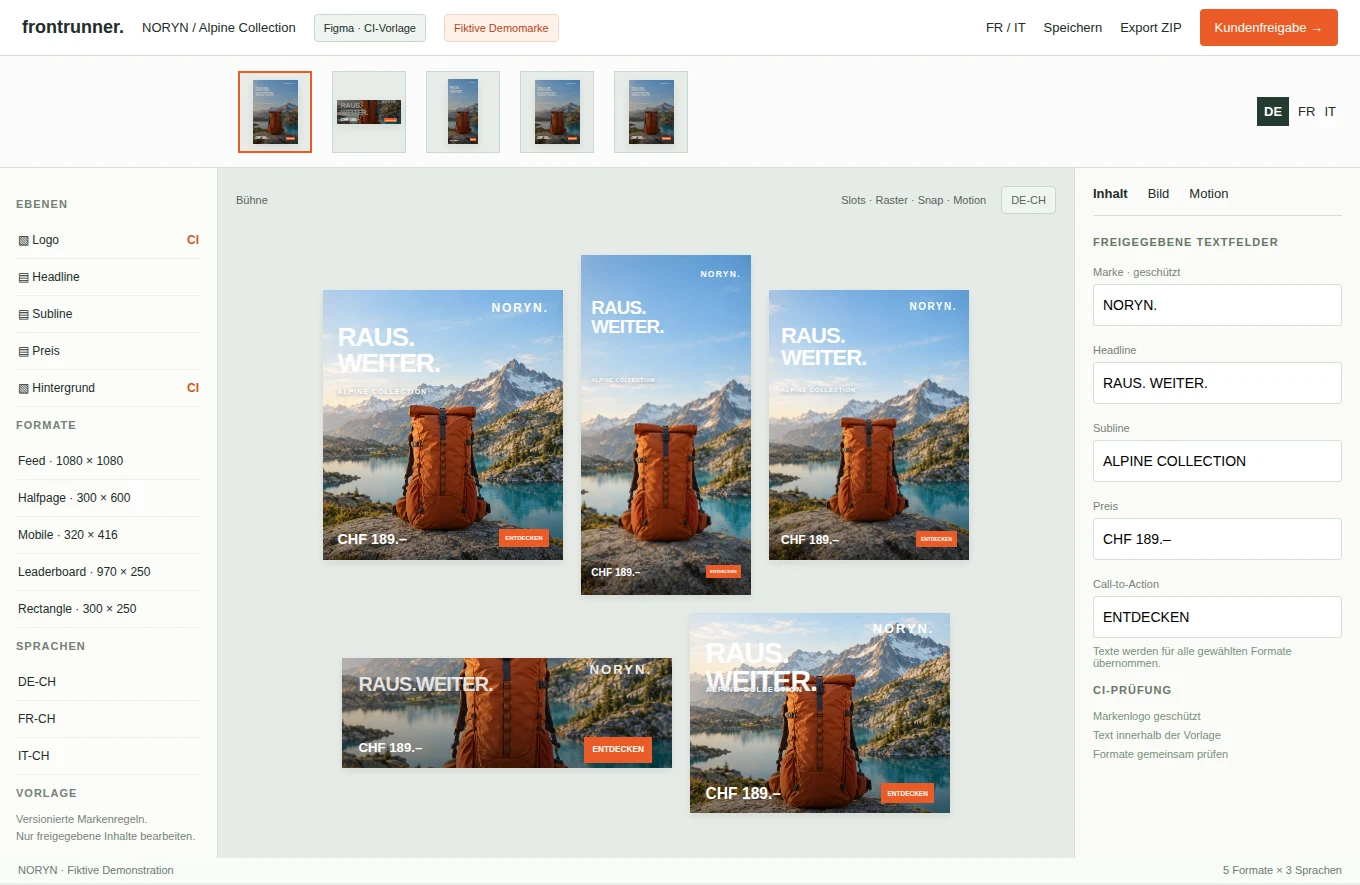
The creative is designed once. Frontrunner turns it into rectangle, half page, billboard, social and screen formats – with a protected logo and approved text fields.
Pro creativeStart with your Figma template, an existing template or directly with products from your catalogue.
You edit the headline, price, button and image crop in a live preview. Protected elements such as logo and colours stay as they are.
All formats are created automatically; French and Italian translations are suggested and approved before launch.
The client or marketing lead approves the banners in the tool. You then book them directly as a campaign.
Display, social and digital screens from the same design – without building each format separately.
Figma templates, protected elements and approved text fields. Freedom where it makes sense.
Animations for HTML5 banners are part of the editor. The banners are prepared for delivery through the common ad networks.
Instead of PDF loops by email, everyone involved sees the same preview and approves the copy directly.
Upload your own images and videos, write copy and have all formats generated automatically. Or use finished creatives.
Matto audiences from Lohncheck data by job, industry and income. You select them in the tool, suggested to match your campaign – depending on consent, segment and channel.
Switzerland, Austria, Germany and other markets in one campaign – with copy per language and reporting by country.
All channels in one media plan, booked via the right platforms. Without your own licence and without ad account setup.
No minimum budget, no licence, no tech fee. You only pay your media budget.
| Format | Name | Use |
|---|---|---|
| 300×250 | Medium Rectangle | Websites and apps, very common |
| 300×600 | Half Page | Websites, lots of space for products |
| 970×250 | Billboard | Prominent at the top of websites |
| 1080×1080 / 1080×1350 | Social Feed | Facebook, Instagram, LinkedIn |
| 1080×1920 | Portrait | Stories, reels, TikTok and digital screens |
Yes. You design banners in the tool from your template or product catalogue, without design software and without building each format separately.
Yes. We take your Figma template as the basis. You decide which elements are protected and which copy and images may be changed.
Yes. You can upload your own HTML5 banners, images and videos at any time and combine them with the banners created in the tool.
The creative editor is included. There is no licence and no fixed fee – you only pay your media budget when you book the banners as a campaign.
In German, French and Italian. Translations are suggested, and you approve each language before launch.
From planning and creative through to booking. Personal and without obligation.